Collection: Golf Simulator Flooring & Underlayment Panels

Most DIY builders spend their whole budget on the screen and launch monitor, then treat flooring as an afterthought. That mistake shows up fast. An uneven foundation can lead to inconsistent golf ball roll and swings, shifting turf during play, and an installation that never quite feels finished.

Our golf simulator flooring and underlayment panels provide a solid foundation between your existing subfloor and putting surface. They help create a level, consistent platform that prevents turf from shifting, keeps the ball rolling, and properly drains water.

One Stop Sim Shop carries four underlayment systems built for this job: UltraBase Professional Panels, UltraBase Champion Panels, Tour Links Panels, and Swiss Trax modular flooring. Each system serves a different purpose, from creating a flat surface for simulator turf to building realistic putting contours for consistent swings. 

If you're building a complete simulator, pair your flooring foundation with quality golf simulator impact screens and putting green turf to create a finished playing surface.

Choosing the Right Underlayment and Hitting Surface for Golf Room

The best flooring for a golf simulator depends on how you plan to use the space, the condition of your existing floor, and whether you want a simple flat surface or a more elaborate putting setup. 

Most DIYers use foam tiles, which are economical but may not provide long-term durability in high-traffic areas. Rubber flooring is another durable option that can reduce vibration and noise, particularly in garages. Whatever system you choose, avoid overly thick foam for the entire flooring to maintain balance during swings.

Here's how these systems compare, so you can land on the best golf sim flooring the first time. 

UltraBase Professional vs. Champion Panels

UltraBase Professional and Champion panels are designed for flat golf simulator flooring applications. Both use 30" x 30" snap-together panels that create a stable foundation under your turf and hitting mat.

Professional Panels use a 4.25-inch hexagonal cell structure to replace compacted rock or concrete outright. It has a load capacity of 998 psi and amazing underfoot strength, making it suitable for golf simulator enclosures that double as workshops and commercial loading bays.

Champion Panels use the same interlocking tooth system and turf-barb technology, but are 3/4-inch thick and much more affordable. For a home simulator room where the floor only needs to support foot traffic and standard equipment, Champion delivers the same true roll-and-bounce surface without paying for extra load capacity. 

Tour Links Panels for Custom Contours

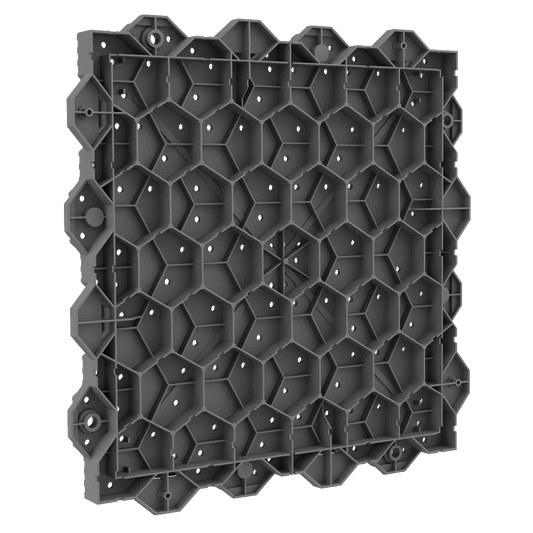
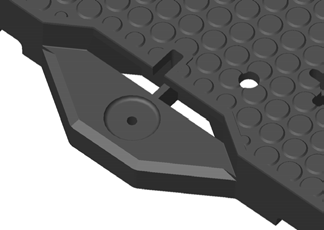
If you're chasing golf simulator flooring ideas that go beyond a dead-flat carpet, Tour Links might be worth considering. Its patented modular interlocking panels are designed to work together to form contours, slopes, and breaks like an actual course, giving you a more useful place to work on your short game and swinging stance.

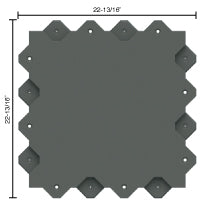
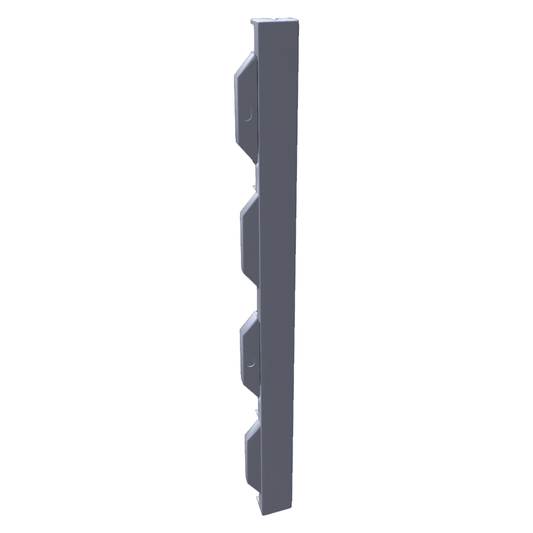
The panels measure approximately 23-13/16" outside-to-outside, with 2" thick interior sections and a 3" lipped edge, which creates the elevation change behind the natural ball break. 

Tour Links ship in multiple shapes, including center panels, cup-hole panels, and curved edge sections, so you can build a more varied layout with real movement that challenges your reads and pace.

Swiss Trax Modular Simulator Flooring

Swiss Trax is the drainage-focused option in this collection. These modular tiles measure 15.75 x 15.75 inches and interlock edge-to-edge, with a channel system beneath that allows airflow and helps with moisture management.

Built with UV-stabilized materials and chemical resistance, Swiss Trax works well in indoor golf spaces, especially garage builds, where the floor may be exposed to changing temperatures and humidity. These tiles handle rollover loads exceeding 60,000 lbs in certain configurations, making them a great option for commercial simulator spaces with consistent foot traffic.

Ribtrax Pro runs 3/4-inch thick, with a textured surface built for durability. Ribtrax Smooth Pro drops to just over 1/2 inch and swaps the texture for a smooth finish. Both tie into the same edge-and-corner trim system, so a garage bay can be scaled up without redesigning the layout.

How to Install Golf Simulator Floor

A DIY golf simulator flooring project doesn't involve pouring a permanent base or gluing multiple layers to the floor, so assembly takes approximately 20 minutes for one person. Modular underlayment panels further simplify the process, but preparation is still important for the finished turf to perform properly. 

Preparing Your Subfloor

Our purpose-built simulator panels are designed to sit directly on a level surface without permanent adhesive. 

Before ordering them, check your subfloor with a long level or straightedge. This is especially important where the putting turf meets a hitting mat, chipping areas, or surrounding floor. A noticeable height difference can create inconsistent ball rolls and create an unnecessary trip point at the panel seams. 

Concrete slabs need to be fully cured and free of major cracks or spalling. When working over plywood, confirm the subfloor doesn’t have flex between joists. Since garages or basements are prone to humidity, use a suitable moisture barrier to prevent long-term issues. 

For rooms with unusual dimensions, custom flooring requests can be accommodated for specific dimensions. If your build also needs wall and ceiling protection, plan that out before panels go down, since it's easier to work in an open room.

Laying Panels and Turf

Once the subfloor is ready, begin laying your panels from one corner and work outward. Snap the first panel into place, then interlock the next one along its edge, working row by row until the section is filled. The tooth-and-slot design self-aligns as you go, so panels stay flush without measuring each seam.

After the underlayment is installed, roll your putting green turf on top, following the integrated hitting strip. A quality hitting mat is essential for protecting joints and ensuring proper club interaction, so select it separately from the general flooring foundation. A replaceable hitting strip can also make maintenance easier, since worn strips can be swapped out without redoing the whole floor.

Also consider how the turf will transition into your hitting surface. If you're pairing panels with True Turf, its 3/4-inch backing lines up evenly with the Champion and E Series underlayments for a flush appearance. 

When in doubt, see our guide on planning your simulator floor layout for detailed instructions

Frequently Asked Questions

What is the best flooring for a golf simulator?

The best flooring solution should balance stance stability, realistic ball roll, durability, and joint protection in a golf room. Flooring should include high-density turf and shock-absorbing materials where appropriate, but the entire floor does not need to be heavily cushioned. You can use UltraBase Pro, Tour Links, or Swiss Trax to get a stable foundation for short games. 

How do I make a golf simulator floor?

Start with a clean, suitable subfloor such as level concrete or plywood. Install interlocking underlayment panels across the space, then lay your putting turf over the finished panel system and integrate your hitting strip. Modular panels make a DIY golf simulator flooring project much simpler because they don't require a permanent adhesive-based subfloor construction.

What is the best turf for golf simulator putting?

Turf performance depends on more than the turf itself. The surface underneath needs to be stable, level, and consistent so the ball can roll properly. Some systems are designed around a putting speed of 9-10 on the Stimpmeter, giving golfers a faster surface for realistic practice.

Others include four built-in cups for short games, which can also enhance the fairway-to-green feel and provide an overall positive experience. Explore our putting green turf collection and consider the underlayment system for the overall build.

Do I need underlayment under my simulator turf?

Putting green underlayment isn't mandatory for every simulator, but it offers several advantages. They help distribute weight evenly, prevent uneven spots from showing through, and can improve comfort underfoot. Purpose-built panels are generally a better fit for a permanent simulator than simply relying on basic gym tiles. 

What is the difference between UltraBase and Tour Links panels?

UltraBase panels offer a firm foundation for simulator turf, while Tour Links panels are built to create contours and breaks into a putting surface. These interlocking foam tiles provide shock absorption and comfort during full swing shots while mimicking the movement of a real golf course.